The menu
One key opens every mod's windows and frees the mouse.
Windows made by mods are shown in the menu. Press F8 to open it. Press F8 again to close it.
While the menu is open
- Every mod's windows are on screen.
- The mouse is free, so you can click.
- The game does not act on your keys or clicks. A click on a button does not also swing your axe.
- Escape closes the menu. If a dropdown list is open, Escape closes that first.
Closing the last window also closes the menu. Open the menu again and the windows are back.
Moving windows around
| To do this | Do this |
|---|---|
| Move a window | Drag its title bar. |
| Resize it | Drag the grip in its bottom right corner. |
| Roll it up to its title bar | Click the minus button. Click the plus to roll it down. |
| Close it | Click the cross. |
| Make the page list wider | Drag the line between the list and the page. |
Wax remembers each window's place and size the next time you play.
Things that are not part of the menu
Overlays and notifications show while you play. They never take the mouse, and clicks go through them.
While the menu is open you can drag an overlay to a new place. Wax remembers that too.
Changing the key
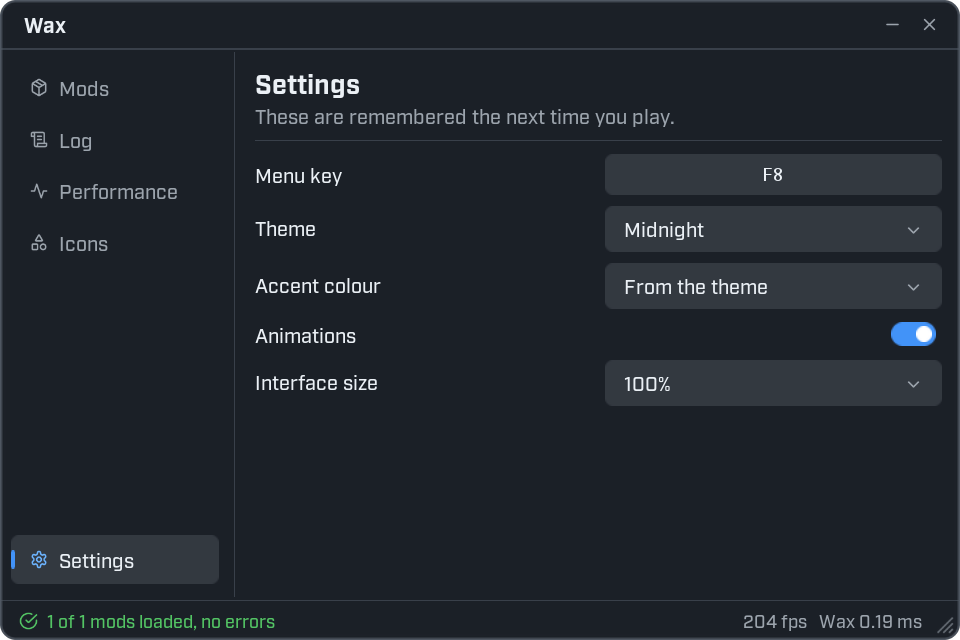
Open the Wax panel, go to Settings and click the Menu key button. Then press the key you want.
The menu from code
local window = ui.Window({ title = "Menu" })

window:Field("Menu key", ui.GetToggleKey() or "none")

window:Button("Close the menu", function()
    ui.Close()
end)

ui.Opened:Connect(function()
    print("The menu opened.")
end)

ui.Closed:Connect(function()
    print("The menu closed.")
end)| Function | What it does |
|---|---|
ui.Open() | Opens the menu. |
ui.Close() | Closes the menu and gives the mouse back to the game. |
ui.Toggle() | Opens it when closed, closes it when open. |
ui.IsOpen() | true while the menu is open. |
ui.SetToggleKey("F9") | Changes the menu key. Pass nil for no key at all. |
ui.GetToggleKey() | The menu key, for example "F8". |
ui.Opened, ui.Closed | Signals that fire when the menu opens and closes. |
ui.KeyChanged | A signal that fires with the new key when the menu key changes. |
Look without taking the mouse
ui.SetPreview(true) shows the windows without freeing the mouse. You keep playing and can see the
windows. Use it for screenshots. ui.SetPreview(false) hides them again.
ui.SetPreview(true)
task.delay(3, function()
    ui.SetPreview(false)
end)
Every function is listed in the ui reference.