3D models
Show a creature of the game in 3D in a window, turning, walking, and turned by the player with the mouse.
container:Model(options) adds a box that shows a creature in 3D. game.Creatures:GetModel(name) gives what
the box needs for one creature. The creature does not have to be in the world.
local window = ui.Window({ title = "Creatures", width = 320, height = 420 })
local view = window:Model({ size = 256, backdrop = true })
local note = window:Label("", { dim = true })

local function show(name)
    local look, why = game.Creatures:GetModel(name)
    if look then
        view:Show(look)
        note:Set("Drag to turn. Wheel to zoom.")
    else
        view:Clear()
        note:Set(why or "No model.")
    end
end

window:Dropdown("Creature", { "Deer", "Conifer_Wolf", "Bear", "Rabbit" }, "Deer", show)
show("Deer")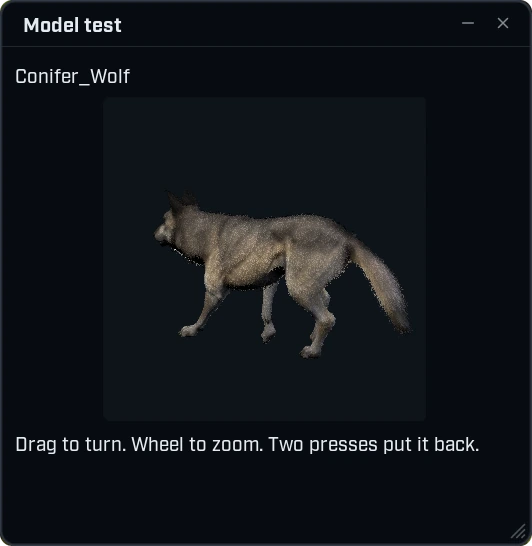
What the player can do
- The model turns slowly by itself until the player touches it.
- Drag turns it. The model follows the mouse: dragged to the right its near side goes right, and dragged down it is seen more from above.
- The wheel moves the camera nearer and further while the mouse is over the view. The page does not scroll then.
- Two presses in a row put the view back, and so does the small button in the corner.
Which creature
game.Creatures:GetModel(name) takes a variant, such as "Bear" or "Conifer_Wolf", or a kind, such as
"Wolf". It gives the creature's mesh, its fur, its other pieces and its animations, read from the game's
own files when Wax was made.
- It gives
niland the reason when Wax has no model for the creature. A creature added by a game update after your Wax was made is one of those. - A name that is no creature raises an error.
- Give the result to
Modelor toShowas it is.
A few creatures do not show well in this version. The bee draws nothing, some large ones are cut by the box where the view starts, and a few are too dark or too bright. Pieces that sit on another skeleton, such as an ice mammoth's armour, are left out.
Options
Model takes the options of a look, and these:
| Option | What it does | When left out |
|---|---|---|
size | The side of a square view. | |
width, height | The size of a view that is not square. | 240 wide, and as tall as it is wide. |
align | Where the view sits in its line: "left", "center" or "right". | "center" |
backdrop | A colour behind the model, or true for the theme's card colour. | See-through. |
spin | Degrees a second it turns by itself. false for none. | 12 |
turn | false: the player cannot turn it. | true |
zoom | false: the wheel is left to the page. | true |
reset | false leaves out the small button that puts the view back. | true |
light | How bright the lights are, from 0 to 4. | 1 |
yaw, pitch, distance | Where the view starts: degrees round the model, degrees above it, and how far away. | -40, 10 and 1 |
animation | "walk", "idle", or false to stand still. | "walk" |
A view made without a mesh shows nothing until you call Show.
Functions and signals
| Function | What it does |
|---|---|
view:Show(look) | Shows another model in the same box. The view goes back to where it starts. |
view:Clear() | Empties the box. |
view:SetAnimation(animation) | Changes what plays: "walk", "idle", or false to stand still. |
view:GetView() | Where the camera is: yaw, pitch and distance. |
view:SetView(yaw, pitch, distance) | Puts the camera somewhere. What is left out stays. The slow turn stops. |
view:Reset() | Puts the view back where it started, and starts the slow turn again. |
view:IsLoaded() | true once the model is in the picture. |
| Signal | Fires when |
|---|---|
view.Loaded | The model is in the picture. |
view.Failed | The mesh could not be loaded, or the game could not make the view. Your function gets the reason. |
view.Turned | The player let go after a drag, turned the wheel or put the view back. Your function gets yaw, pitch and distance. |
view.Clicked | The player pressed the view and let go without turning it. |
local window = ui.Window({ title = "Bear", width = 300, height = 360 })
local view = window:Model({ size = 240, spin = false })
local status = window:StatusBar("Loading...")

view.Loaded:Connect(function()
    status:Set("Click the bear to make it stand or walk.", { kind = "good" })
end)
view.Failed:Connect(function(reason)
    status:Set(reason, { kind = "bad" })
end)

local walking = true
view.Clicked:Connect(function()
    walking = not walking
    view:SetAnimation(walking and "walk" or "idle")
end)

local bear = game.Creatures:GetModel("Bear")
if bear then view:Show(bear) end
A young animal beside its parent
Every model is fitted to its box, so a cub would look as large as a bear. Give a look against another one
and it is drawn as much smaller as it is in the game.
local window = ui.Window({ title = "Sizes", width = 300, height = 300 })

local wolf = game.Creatures:GetModel("Conifer_Wolf")
local rabbit = game.Creatures:GetModel("Rabbit")
if wolf and rabbit then
    local small = { against = wolf }
    for key, value in pairs(rabbit) do
        small[key] = value
    end
    window:Model({ size = 200 }):Show(small)
end
It never fills less than four tenths of the box.
Any other mesh
A look is a table, and you can write one yourself for any skeletal mesh of the game: mesh is its path, and
materials, parts, walk and idle are optional. A mesh that is not a skeletal mesh fires Failed.
local window = ui.Window({ title = "Deer", width = 300, height = 300 })
window:Model({
    size = 200, mesh = "/Game/ASS/CRE/Deer/SK_CRE_PAS_Deer", animation = false,
})
Finding the paths is on Assets.
What it costs
- The first time a creature shows, the game loads its mesh, which holds the game up once: 10 ms for a bear and up to about 100 ms for the largest when it was measured.
- A view that shows is drawn again every frame. One view 256 wide cost about half a millisecond a frame.
- Nothing is drawn while the view is not on screen: a closed menu, another page, or scrolled out of sight.
Five views in one window were seen working. It works in a window and in a panel.
Every option is listed in the ui reference.