Windows
Make a window, give it pages, and add a status bar.
A window is a box in the menu that holds your controls.
local window = ui.Window({ title = "My first mod", icon = "sparkles", width = 300, height = 170 })

window:Label("Hello from my first mod.")
window:Toggle("Show the overlay", true)
window:Button("Say hi", function()
    ui.Notify("Hi!")
end, { primary = true })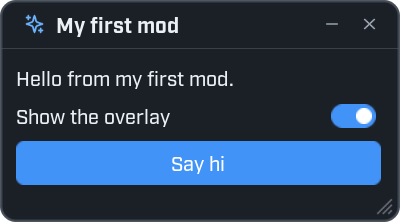
Press F8 to see it. The title bar has a button to roll the window up, and a cross to close it. The user can drag the window by its title bar and resize it by its bottom right corner.
Everything you add with window:Something(...) is a control. The Controls page lists them all.
Options
ui.Window takes one table. Every entry is optional.
| Option | What it does | When left out |
|---|---|---|
title | The text in the title bar. | "Window" |
icon | An icon shown before the title. | No icon. |
width | The width. | 340, or 520 with side pages. |
height | The height. | 420, or 380 with pages. |
x, y | Where the window first appears, counted from the top left of the screen. | A little below and to the right of the window before it. |
closable | false leaves out the close button. | true |
visible | false makes the window hidden. Show it later with window:Show(). | true |
nav | "side" or "top" gives the window pages. See below. | No pages. |
nav_width | The width of the page list of a "side" window. | The theme's width. |
remember | false stops Wax remembering where the user put the window. | true |
Give each window its own title
Wax remembers a window's place and size by its title. Two windows of one mod with the same title would share one place.
Show, hide and change
local window = ui.Window({ title = "Tools", visible = false })
window:Label("Opened with F6.")

ui.Hotkey("F6", function()
    window:Show()
    ui.Open()
end)

window.Closed:Connect(function()
    print("The Tools window was closed.")
end)| Function | What it does |
|---|---|
window:Show() | Shows the window, in front of the others. |
window:Hide() | Hides it. Hiding the last window closes the menu. |
window:SetVisible(shown) | Shows or hides it. |
window:IsVisible() | true while it is shown. |
window:SetTitle(text) | Changes the title. |
window:SetPosition(x, y) | Moves it. It always stays on the screen. |
window:SetSize(width, height) | Resizes it. A window does not go below its smallest size. |
window:SetMinimized(true) | Rolls it up to its title bar. false rolls it back down. |
window:IsMinimized() | true while it is rolled up. |
window:Destroy() | Removes the window and everything on it. |
| Signal | Fires when |
|---|---|
window.Opened | The window is shown. |
window.Closed | The window is hidden. |
window.PageChanged | Another page is chosen. Your function gets the page's name. |
A window is removed when your mod reloads. init.lua then makes it again.
ui.Windows() gives a list of every window in the menu.
Pages down the side
Give a window nav = "side" and it gets a list of pages on the left. window:Page adds a page. Add
controls to the page, not to the window.
local window = ui.Window({ title = "Pages", nav = "side", width = 460, height = 260 })

local home = window:Page("Home", { icon = "home" })
home:Title("Home", "Pages are listed down the side.")
home:Button("Start", function()
    ui.Notify("Started.")
end, { primary = true })
home:Toggle("Remember me", true)

local players = window:Page("Players", { icon = "users" })
players:Label("Nobody else is here.")

local settings = window:Page("Settings", { icon = "settings", bottom = true })
settings:Label("This page sits at the foot of the list.")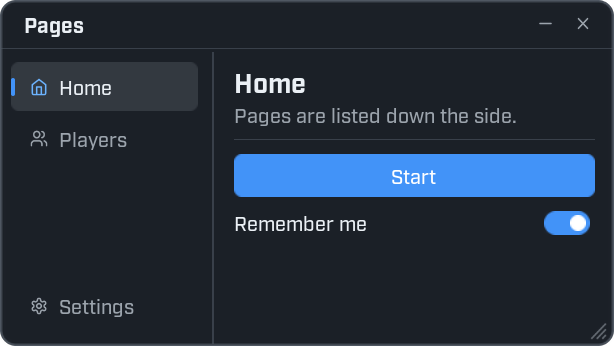
The first page you add is the one that shows first. The user can drag the line beside the list to make the list wider.
Pages along the top
With nav = "top" the pages become tabs. The tabs are all the same width, and the window cannot be made
narrower than its tabs need.
local window = ui.Window({ title = "Tabs", nav = "top", width = 400, height = 210 })

local overview = window:Page("Overview")
overview:Label('With nav = "top" the pages are tabs along the top.')
overview:Progress("Level", 0.4)

local details = window:Page("Details")
details:Label("More to read here.")

local about = window:Page("About")
about:Label("Made with Wax.")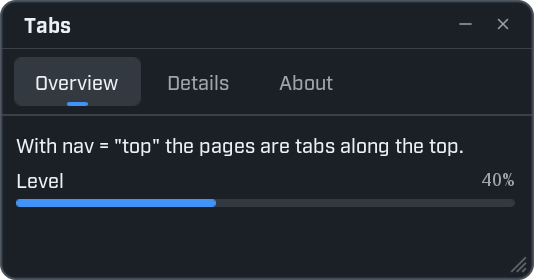
Page options and functions
Option of window:Page(name, options) | What it does |
|---|---|
icon | An icon shown before the page's name. |
bottom | true lists the page at the foot of a side list. Good for a settings page. |
scroll | false makes a page that does not scroll. A Grid or Console on it then fills the space that is left. |
| Function | What it does |
|---|---|
window:Page(name, options) | Adds a page and gives it back. |
window:SelectPage(name) | Switches to the page with that name. |
window:RemovePage(page) | Removes a page and everything on it. |
window:SetNavWidth(width) | Sets the width of the side list. |
If you add a control straight to a window that has pages, Wax puts it on a first page called Main.
Load more when the user reaches the end
A page has a signal called NearEnd. It fires when the user scrolls close to the bottom. Use it to add
more as the user scrolls.
local window = ui.Window({ title = "Endless", nav = "top", width = 360, height = 300 })
local page = window:Page("Numbers")

local count = 0
local function add_more()
    if count >= 200 then return end
    for _ = 1, 20 do
        count = count + 1
        page:Label("Line " .. count)
    end
end

add_more()
page.NearEnd:Connect(add_more)
NearEnd also fires a few times a second while the page is not full yet. So do nothing when there is no more
to add, as the first line of add_more does.
For very long lists, use a Grid instead.
A status bar
window:StatusBar() adds a line along the bottom of a window. Use it to say what your mod is doing.
local window = ui.Window({ title = "Status bar", height = 145 })
window:Label("A status bar sits along the bottom of a window.")

local status = window:StatusBar()
status:Set("3 of 4 mods loaded", { kind = "good", icon = "check-circle" })
status:Progress(0.6)
status:Right("v1.2")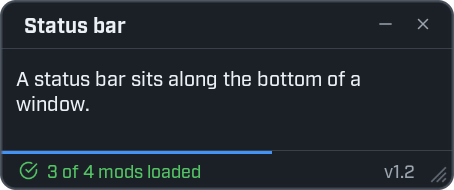
| Function | What it does |
|---|---|
status:Set(text, options) | Shows a message. kind sets the colour: "info", "good", "warn" or "bad". icon adds an icon. |
status:Busy(text) | Shows a message with a spinning circle, until the next Set. |
status:Progress(amount) | Shows a thin line across the bar, from 0 to 1. nil hides it. |
status:Right(text) | Shows text at the right-hand end. |
status:Clear() | Empties the message and hides the line. |
This example shows a status bar while a task counts through ten steps:
local window = ui.Window({ title = "Working", height = 160 })
local status = window:StatusBar("Ready")

window:Button("Start", function()
    status:Busy("Working...")
    for step = 1, 10 do
        task.wait(0.2)
        status:Progress(step / 10)
    end
    status:Progress(nil)
    status:Set("Done", { kind = "good", icon = "check" })
end)
Every function is listed in the ui reference.