Overlays
A panel that stays on screen while you play.
An overlay is a panel pinned to the screen. It stays up while you play, and it never takes the mouse. Clicks go through it. Use it for things you only read, such as your position or a health bar.
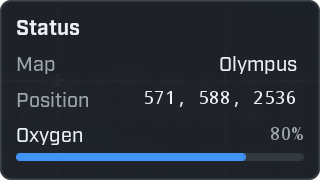
local hud = ui.Overlay({ title = "Status", anchor = "top-left" })

local map = hud:Field("Map", game.MapName or "none")
local position = hud:Field("Position", "", { mono = true })
local oxygen = hud:Progress("Oxygen", 0.8)
An overlay is a container, like a window. Add controls to it the same way. Nobody can click an overlay, so
use controls that show things: Label, Heading, Field, Progress, Icon, Separator.
Keep it up to date
The example above shows values that never change. Use a task to update them.
local hud = ui.Overlay({ title = "Status", anchor = "top-left" })

local map = hud:Field("Map", game.MapName or "none")
local position = hud:Field("Position", "", { mono = true })

local function where_am_i()
    local character = game.Character
    if not character then
        return "no character"
    end
    local at = character:K2_GetActorLocation()
    return ("%.0f, %.0f, %.0f"):format(at.X, at.Y, at.Z)
end

task.spawn(function()
    while true do
        position:Set(where_am_i())
        task.wait(0.5)
    end
end)

game.MapChanged:Connect(function(name)
    map:Set(name)
end)
Walk around and the position changes. For a bar that shows a real value, see Example: player stats.
Options
ui.Overlay takes one table. Every entry is optional.
| Option | What it does | When left out |
|---|---|---|
anchor | Where on the screen the panel is pinned. | "top-right" |
x, y | How far in from that edge of the screen. | 16 |
width | The width of the panel. | 240 |
title | A heading at the top. | No heading. |
background | false leaves out the dark panel, so only the controls are drawn over the game. | true |
There are nine anchors. Each name says where on the screen it is:
"top-left"       "top"       "top-right"
"left"          "center"         "right"
"bottom-left"   "bottom"  "bottom-right"
Show, hide and move
local hud = ui.Overlay({ title = "Compass", anchor = "top" })
hud:Label("Press F6 to hide or show me.")

ui.Hotkey("F6", function()
    hud:SetVisible(not hud:IsVisible())
end)| Function | What it does |
|---|---|
overlay:SetVisible(shown) | Shows or hides the overlay. |
overlay:IsVisible() | true while it is shown. |
overlay:SetAnchor(anchor, x, y) | Pins it somewhere else. Leave x and y out to keep their values. |
overlay:Destroy() | Removes the overlay and everything on it. |
The player can move it
Open the menu with F8. Every overlay gets an outline, and you can drag it to another place. Wax remembers where you left it.
Let the player switch it off
Some players do not want a panel on screen all the time. Add a switch for the overlay to a window, and save the choice.
local settings = storage.Load("settings", { overlay = true })

local hud = ui.Overlay({ title = "Status" })
hud:Field("Map", game.MapName or "none")
hud:SetVisible(settings.overlay)

local window = ui.Window({ title = "Status settings", width = 300, height = 140 })
window:Toggle("Show the overlay", settings.overlay, function(on)
    settings.overlay = on
    storage.Save("settings", settings)
    hud:SetVisible(on)
end)
Every function is listed in the ui reference.