Printing and the log
See what your mod is doing with print and log.
To see what your code does, print it.
print("Hello from my mod")
print("Map:", game.MapName)
print(1, 2, 3)
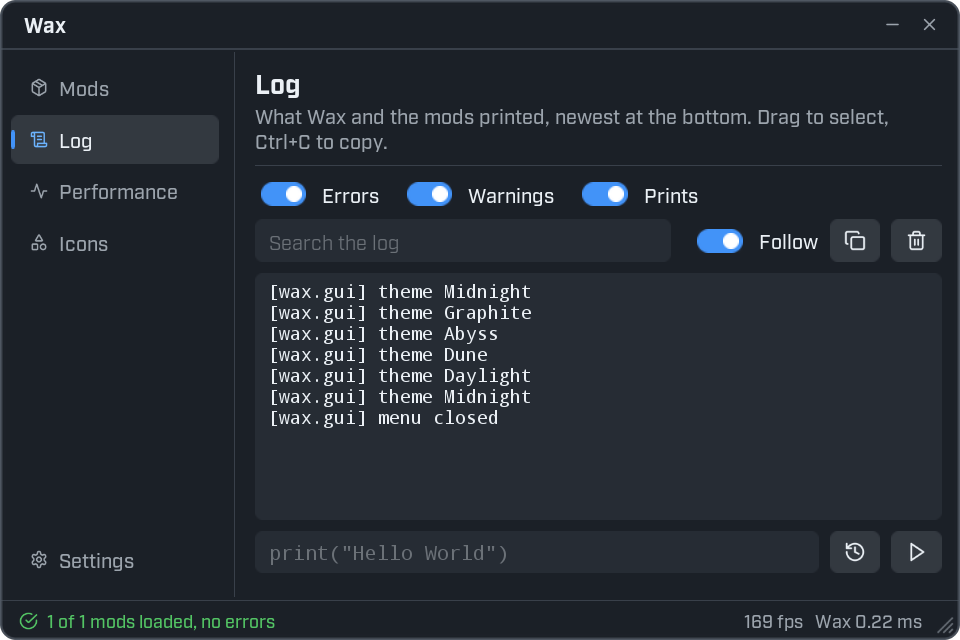
Open the Log page of the Wax panel. Each line starts with your mod's id in square brackets:
[MyMod] Hello from my mod
[MyMod] Map:    Station_MAS
[MyMod] 1       2       3
print takes any number of values and puts a tab between them.
Warnings and errors
print is for normal messages. log lets you say how serious a message is.
log:info("Loaded %s version %s", mod.name, mod.version)
log:warn("Fuel is at %d percent", 12)
log:error("Could not find %s", "the door")| Function | Use it for | In the Log page |
|---|---|---|
log:info(...) | Normal messages. print writes at this level too. | Shown with the Prints switch. |
log:warn(...) | Something looks wrong, but the mod carries on. | Yellow. Shown with the Warnings switch. |
log:error(...) | Something failed. | Red. Shown with the Errors switch. Also pops up as a notification. |
log:debug(...) | Details you only want while looking for a bug. | Grey. |
log:trace(...) | Very fine detail. Dropped by default. | Not shown. |
- Write
log:infowith a colon. - The first value is a pattern, as in Lua's
string.format.%sstands for any value and%dfor a whole number. The values after it fill those places.
Repeated lines
When the same message is logged several times in a row, the log shows it once, with a count at the end:
[MyMod] tick (x12)When your mod has an error
You don't need to catch errors yourself. Wax catches them.
- The error goes to the log, in red, with the file and line it came from.
- A red notification shows the first line of the error.
- Only the code that failed stops: that click, that task. The rest of your mod keeps running.
- The one exception is an error while
init.luaitself is running. Then the mod does not load until you fix it.
local window = ui.Window({ title = "Errors" })

window:Button("Break something", function()
    local nothing = nil
    print(nothing.name)   -- an error: nothing is nil
end)

window:Button("Still works", function()
    ui.Notify("This button is fine.")
end)
Click Break something. A red message appears and the log shows the line number. Then click Still works. Its message shows, because the error stopped only the first click.
If the log says switched off after 5 consecutive errors, a function kept failing every time it ran, and
Wax stopped calling it. Fix the error and save the file.
Outside the game
Everything in the log is also written to the game's UE4SS.log file, so you can read it after the game has
closed.
Every function is listed in the mods reference.