Blueprints
Describe a thing in Lua, with parts, meshes, materials and functions, and spawn it into the world.
A blueprint describes a kind of thing: which parts it has, what they show, and which of your functions
run for it. blueprint:Spawn then puts one into the world. No file is made: a thing is an actor of a class
the game already has, put together from your description.
local CUBE = "/Engine/BasicShapes/Cube.Cube"
local GLOW = "/Engine/EngineMaterials/EmissiveMeshMaterial"
local SHOWS = "/Engine/EngineMaterials/Widget3DPassThrough_Opaque"
local WOOD = "/Game/Assets/2DArt/UI/Items/Item_Icons/Resources/ITEM_Wood.ITEM_Wood"

local crate = game.Blueprints:Define("Crate", {
    parts = {
        Body = { mesh = CUBE, root = true, scale = 0.6, collision = "none",
                 material = { from = SHOWS, textures = { SlateUI = WOOD } } },
        Top = { mesh = CUBE, at = { 0, 0, 75 }, scale = 0.4, rotation = { Yaw = 45 }, collision = "none",
                material = { from = GLOW, colors = { Color = "Orange" } } },
        Lamp = { class = "PointLightComponent", at = { 0, 0, 160 },
                 set = { IntensityUnits = 1, Intensity = 200, AttenuationRadius = 600, CastShadows = false } },
    },
    stepped = function(thing, dt)
        local data = thing.Data
        data.yaw = ((data.yaw or 0) + 90 * dt) % 360
        thing.Facing = { Yaw = data.yaw }
    end,
})

local window = ui.Window({ title = "Crates", width = 280, height = 120 })

window:Button("Spawn a crate", function()
    if not game.IsHost or not game.Me.Exists then return end
    local me = game.Me.Position
    crate:Spawn({ X = me.X + 300, Y = me.Y, Z = me.Z })
end)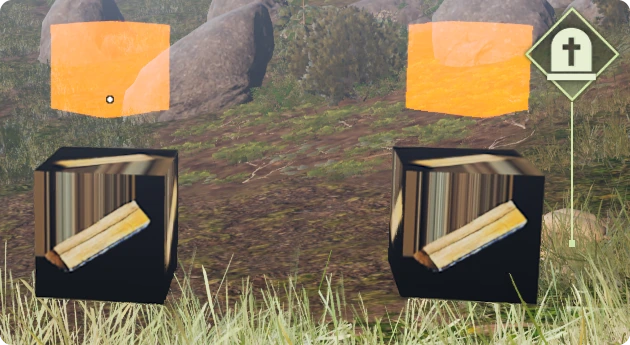
Parts
A thing is made of parts. A part is a component of the game with what it shows and where it sits.
| In a part | What it is |
|---|---|
mesh | What it shows: the path of a mesh of the game, or a shape from game.Assets:Mesh. |
class | The component class, such as "PointLightComponent". Left out, it follows from the mesh. |
material | The material of its first slot: a path, a material, or a table that says what to make. |
at | Where it sits, measured from the thing: { 0, 0, 100 } is one metre up. |
rotation | How it is turned, in degrees: { Yaw = 45 }. |
scale | Its size against the size its mesh has by itself. One number, or one for each direction. |
collision | "none": things pass through. "solid": things stop at it, which is what a mesh part does when nothing is said. "touch": things pass through and your touched function hears of them. |
set | Properties of the component, by name, written before the game starts using it. |
root | true for the part the others hang on. It stands where the thing is spawned. |
- Give the parts by name, as above, or as a list in which each has a
name. A blueprint can have 64. - With parts given by name, say which one is the
rootwhen more than one has a place. - Paths and option names are checked when you call
Define. A wrong path or a misspelt option raises an error there, with the nearest right name, and not at the first spawn.
A material for a part
Give material a table and the blueprint makes the material itself from one of the game's:
local part = {
    mesh = "/Engine/BasicShapes/Cube.Cube",
    material = {
        from = "/Engine/EngineMaterials/EmissiveMeshMaterial",
        colors = { Color = "Cyan" },
    },
}
print(part.material.from)
It is made once, shared by every thing of the blueprint, and made again after a map change. The names under
colors, numbers and textures belong to the material you start from. See
Assets.
A shape of your own
A part can show a shape made of numbers in place of a mesh of the game:
local slab = game.Assets:Mesh({ box = { X = 200, Y = 200, Z = 20 }, collision = true })

local platform = game.Blueprints:Define("Platform", {
    parts = {
        Floor = { mesh = slab, material = { from = "/Engine/EngineMaterials/EmissiveMeshMaterial",
                                            colors = { Color = "Blue" } } },
    },
})
print(platform.Name)
This has not been tried in the game yet. It runs in Wax's tests outside the game. What was seen in the game
is the call the blueprint makes for such a part, mesh:Apply, on a
part that a script made itself.
Spawn
blueprint:Spawn(position, rotation, data) puts one in the world and gives you the thing.
positionis{ X = , Y = , Z = }or{ x, y, z }.rotationis a turn in degrees and may be left out.datais a table of your own that the thing keeps asthing.Data.- A mistake while the thing is put together raises an error and leaves nothing standing.
| On a thing | What it is |
|---|---|
thing.Data | Your own table for this thing. |
thing.Position | Where it is. Assign a position to move it there at once. |
thing.Facing | How it is turned, in degrees. Assign a turn to set it. |
thing.Alive | true until the thing is gone. Reading it never raises an error. |
thing.Actor | The Instance of its actor, for functions that take an Instance. |
thing.Blueprint | The blueprint it came from. |
thing:Part(name) | The Instance of one of its parts. |
thing:AddPart(name, part) | Makes one more part on it. |
thing:GetBounds() | The box all its parts fit in. |
thing:Destroy() | Takes it out of the world with all its parts. |
A thing also has everything its actor has: thing.Name, thing:IsA("Actor"), and the actor's own
properties and functions.
blueprint:GetThings() lists the things of a blueprint that are in the world, and blueprint:Count()
counts them. game.Blueprints:GetThings() lists the things of every blueprint.
local crate = game.Blueprints:Get("Crate")
if crate then
    for _, thing in ipairs(crate:GetThings()) do
        thing:Destroy()
    end
end
Functions that run for a thing
| In the blueprint | When it runs |
|---|---|
began = function(thing) | Once, when the thing is in the world with its parts. |
stepped = function(thing, dt) | Every frame, with the seconds since it last ran for that thing. |
every = { 0.5, function(thing, dt) end } | At its own pace: the seconds between two runs, then the function. |
touched = function(thing, other) | When an actor starts to overlap a part with collision = "touch". |
ended = function(thing, reason) | Once, a frame after the thing has gone. Only Data, Blueprint and Alive can be read then. |
- All
steppedandeveryfunctions together get 2 ms of a frame. What is left over waits a frame. - The time is real time, so
steppedalso runs while the game is paused. endeddoes not run when the blueprint is removed or your mod unloads.
What does not last
- The game does not save things. They are gone after a map change, after leaving the prospect and after
a restart. Spawn them again, for example on
game.MapChanged. The blueprint itself stays through a map change. - When your mod unloads or reloads, its things are destroyed and its blueprints forgotten.
- Defining a name again replaces the blueprint, and the things of the old one are destroyed.
What has been seen
The crate above was spawned on the host of a prospect: three crates, each turning from Lua, with their lamps lit. Defining took 1 to 2 ms, a spawn about half a millisecond. These have not been looked at yet:
- Whether the other players of a session see a thing.
- A base class other than
"Actor".basetakes another class by name, or a blueprint class of the game by its path, and then the thing is that actor. Only"Actor"has been seen working. touchedandcollision = "touch", and moving a thing by assigningthing.Position.- Part classes other than a mesh part, a shape part and a point light.
While no blueprint is defined, this costs nothing. With things in the world and no functions given, a frame costs one question to the game at most.
Every function is listed in the Blueprints reference.