Notifications
Short messages in a corner of the screen.
A notification is a short message in a corner of the screen. It shows while you play and goes away by itself. It never takes the mouse.
ui.Notify("A plain note for the player.")Kinds
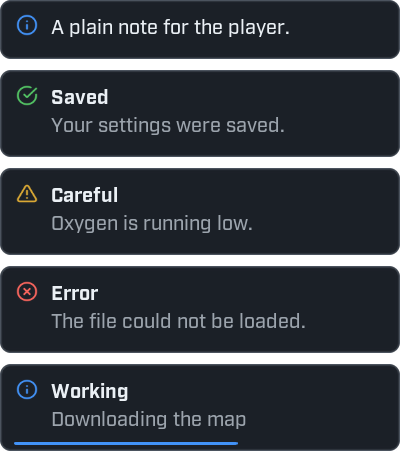
ui.Notify("A plain note for the player.")
ui.Notify("Your settings were saved.", { title = "Saved", kind = "good" })
ui.Notify("Oxygen is running low.", { title = "Careful", kind = "warn" })
ui.Notify("The file could not be loaded.", { title = "Error", kind = "bad" })
ui.Notify("Downloading the map", { title = "Working", progress = 0.6 })
ui.Notify(text, options) shows a notification. You can leave out any option.
| Option | What it does | When left out |
|---|---|---|
title | A bold line above the text. | No title. |
kind | "info", "good", "warn" or "bad". It sets the colour and the icon. | "info" |
icon | An icon of your choice, in place of the kind's own. | The kind's icon. |
seconds | How long it stays. 0 keeps it until it is closed. | 4 |
progress | A number from 0 to 1. It shows a progress line, and the notification stays until it is closed. | No progress line. |
Write ui.Notify with a dot, not a colon.
The same message twice
If you show a message that is already on screen, Wax does not add a copy. The one that is showing starts
its time again and shows a count: x2, x3.
local window = ui.Window({ title = "Notifications", width = 300, height = 140 })

window:Button("Show it again", function()
    ui.Notify("You clicked the button.")
end)
Click a few times in a row. You get one notification with a counter.
Change a notification that is showing
ui.Notify gives the notification back. You can change it while it is on screen. Use that to show the
progress of a job.
local window = ui.Window({ title = "Download", width = 300, height = 140 })

window:Button("Start", function()
    local job = ui.Notify("Downloading the map", { title = "Working", progress = 0 })

    for step = 1, 10 do
        task.wait(0.3)
        job:SetProgress(step / 10)
    end

    job:SetTitle("Done")
    job:SetText("The map is ready.")
    task.wait(1.5)
    job:Close()
end)| Function | What it does |
|---|---|
notification:SetText(text) | Replaces the text. |
notification:SetTitle(title) | Replaces the title. It does nothing on a notification made without a title. |
notification:SetProgress(amount) | Shows how far a job is, from 0 to 1. The notification then stays until it is closed. |
notification:Close() | Closes the notification. |
Where they appear, and how many
Notifications start in the bottom right corner, and at most five show at once.
ui.Notifications.SetCorner("top-right")
ui.Notifications.SetLimit(3)

ui.Notify("Now I appear at the top right.")| Function | What it does |
|---|---|
ui.Notifications.SetCorner(name) | Moves notifications to "top-left", "top-right", "bottom-left" or "bottom-right". The ones showing are closed. |
ui.Notifications.SetLimit(count) | Sets how many show at once. At least 1. |
ui.Notifications.Clear() | Closes every notification. |
ui.Notifications.Count() | How many are showing. |
The corner and the limit are the same for every mod, so change them only if the player asks.
When there are too many, the oldest one that is only counting down is closed first. A notification that shows the progress of a job stays in view.
Errors show up here too
When a mod has an error, Wax shows it as a red notification by itself. See Printing and the log.
Every function is listed in the ui reference.