Hot reload
Save a file and your mod reloads in the running game.
Save a .lua file of your mod. A moment later, Wax reloads that mod. The game keeps running.
Nothing has to run next to the game for this. Wax watches your mod's files from inside the game.
What a reload does
- Wax removes everything the mod made: windows, overlays, hotkeys, tasks and signal connections.
- Wax runs
init.luaagain, from the top.
So after a reload your mod is in the same state as after a fresh start. Local variables start again too.
Mods that depend on the reloaded mod reload after it.
Keep a value across reloads
Use persist for values that should live through a reload.
local state = persist("state", { loads = 0 })
state.loads = state.loads + 1

local window = ui.Window({ title = "Reload counter" })
window:Field("Times loaded", state.loads)
Save the file a few times. The number goes up each time.
persist("state", { loads = 0 }) gives back the same table on every reload. The second value is only used
the first time. Change what is inside the table; do not replace the table.
persist forgets everything when the game closes. To keep settings between game sessions, use
storage.
When a reload fails
If the new code has an error, the mod does not load.
- A red notification shows the error.
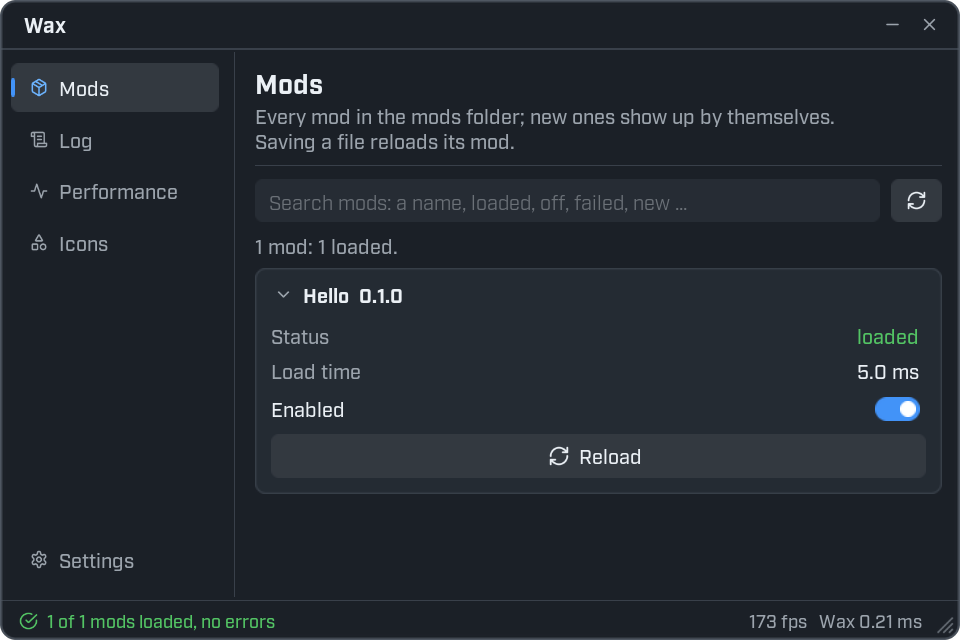
- The Mods page marks the mod as failed and shows the error under its name.
Fix the file and save. Wax tries again by itself.
New mods start switched off
Add a new mod folder while the game is running, and Wax lists it switched off. A notification tells you. Open the Mods page and flip its Enabled switch to load it.
Mods that are there when the game starts load straight away.
Wax looks for new mod folders when you open the menu. While the Mods page is showing it looks again every couple of seconds. The refresh button beside the search box looks right now.
Reload by hand
Each mod on the Mods page has a Reload button. Use it when you want a fresh start without changing a file.
Switch a mod off
Flip a mod's Enabled switch off. The mod unloads and everything it made is removed. It stays off the next time you start the game, until you switch it on again.
Good habits
- Build your interface at the top level of
init.lua. Then it is rebuilt on every reload. - Do not keep game objects in
persist. They can be gone by the time you use them, for example after a map change. Get them again fromgame. - Remove a mod's folder to remove the mod. Wax unloads it the next time it looks.