Installing
Download Wax, put it in the game folder and check that it works.
This is an early version of Wax.
What you need
ICARUS on Steam, on Windows. You install nothing else. UE4SS, the script loader Wax runs on, is in the download.
Download
Download Wax-0.1.0.zip from the latest release.
The number in the file name is the version. Extract the whole zip before you run anything in it.
The same page has the VS Code extension as a .vsix file. The editor page says what it is for.
| In the zip | What it is |
|---|---|
Install Wax.cmd | Copies Wax into your game. |
Update Wax.cmd | Looks for a newer Wax and installs it. |
Uninstall Wax.cmd | Removes Wax from your game. |
Wax-Setup.ps1 | The script those three files run. You don't need to open it. |
README.txt | The steps on this page, as a text file. |
licenses | The licences of UE4SS and of the Lucide icons. |
game | The files that go into the game folder. |
Inside game:
In game | What it is |
|---|---|
dwmapi.dll and the ue4ss folder | UE4SS. |
ue4ss\Mods\Wax | Wax. |
ue4ss\Mods\Wax\mods\Hello | An example mod. |
Install
Close ICARUS first. Then install in one of two ways.
Install with the installer
Double-click Install Wax.cmd. It finds the game through Steam and copies the files. If it can't find the
game, it asks you for the folder.
The installer also sets up the Add to game button of the Mods page for this PC.
Windows may ask you to confirm first, because the file came from the internet.
Install by hand
Copy everything inside the game folder into this folder of the game:
...\steamapps\common\Icarus\Icarus\Binaries\Win64\To find it, right-click ICARUS in Steam and choose Manage, then Browse local files. Open Icarus,
then Binaries, then Win64.
When you are done, dwmapi.dll and the ue4ss folder sit next to Icarus-Win64-Shipping.exe.
If you already use UE4SS
Wax is tested on the UE4SS build in the zip, so the installer puts that build in. If it finds a different
one, it first copies the old files to a folder inside Win64. The folder's name is ue4ss-backup- followed
by the date and time. Your other UE4SS mods in ue4ss\Mods are left alone.
Check that it works
Start the game
Start ICARUS the way you always do. Nothing else has to run next to it.
Press F8
The menu opens and you see the Wax panel. Its Mods page lists every mod Wax found. After a new install that is the example mod, Hello.
Look at the status line
The bottom of the panel says how many mods loaded, and whether there were errors.
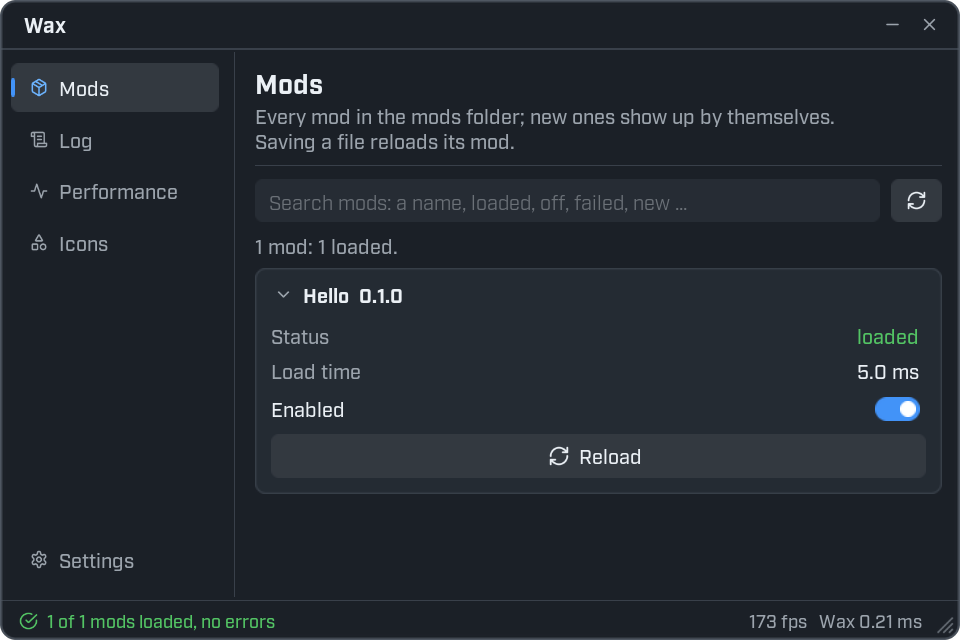
Where Wax is
Wax sits in the UE4SS mods folder inside the game:
...\steamapps\common\Icarus\Icarus\Binaries\Win64\ue4ss\Mods\Wax\Two folders in there matter to you:
| Folder | What is in it |
|---|---|
Wax\mods\ | Your mods. One folder for each mod. |
Wax\saved\ | Settings that Wax and your mods save. You never need to edit these by hand. |
Where your mods go
Each mod is a folder inside Wax\mods\. The folder holds a file called init.lua.
...\ue4ss\Mods\Wax\mods\
    MyFirstMod\
        init.lua
The folder name is the mod's id. Use only letters, digits, _ and - in it. A folder with another kind of
name is skipped, and the log says so.
Updating
Close ICARUS first.
Update with the installer
Double-click Update Wax.cmd. It asks GitHub for the newest release and installs it if it is newer than
yours.
You can also download the newest zip and run its Install Wax.cmd. Installing over an old copy updates Wax.
Both ways keep your mods (Wax\mods), your settings (Wax\saved) and your UE4SS settings.
Update by hand
Download the newest zip and copy the contents of game into Win64 again. Say yes when Windows asks to
replace files.
Your own mods and your settings are not in the zip, so they stay. Two things are replaced by the copies from the zip:
- the example mod,
mods\Hello - the UE4SS settings files
UE4SS-settings.ini,mods.txtandmods.json
Removing Wax
Close ICARUS first.
Remove with the installer
Double-click Uninstall Wax.cmd. It removes Wax. It asks before it removes your mods and settings, and
before it removes UE4SS. Press Enter at a question to keep them.
Remove by hand
Delete this folder:
...\steamapps\common\Icarus\Icarus\Binaries\Win64\ue4ss\Mods\Wax\Your mods and settings are in it. Copy mods and saved somewhere else first if you want to keep them.
To remove UE4SS too, delete dwmapi.dll and the ue4ss folder from Win64.
Switching a mod off, or removing it
- To switch a mod off, use its Enabled switch on the Mods page. It stays off the next time you play.
- To remove a mod, delete its folder from
Wax\mods\.
Next: write your first mod.